Papyrus 12 Changelog

... what's new?

12.05a

15.05.2026

Spring Update 2026

The new version bundles some neat optimizations with a whole bunch of fixes and improvements:

Performance

  • Greatly improved project loading times in Papyrus’s start view.

  • The Windows installer now runs in 64-bit and speeds up the installation process.

  • macOS: Improved PDF creation with emojis, which had led to large files. Now a repeatedly used emoji is converted to a bitmap only once, saving space.

Writing Flow

  • The personal dictionary now takes priority over autocorrect, so your own words are no longer corrected by mistake.

  • In typewriter mode, words near the center line can now be selected more reliably with a double-click.

  • In Distraction Free Mode, the master pages view can no longer be activated by accident.

  • Undo/Redo now works more reliably when editing global notes.

Fonts, Images & PDF

  • Custom fonts are now queried from the system more reliably, so font mix-ups happen less often. OpenType fonts are now also supported in PDF output.

  • Custom cover images for projects that share names will now all be offered for selection.

  • Images in the Thinkboard now apply correct transparency to rounded shapes, especially important in Dark Mode, where white edges could appear.

  • Improved duplicate prevention when identical images are copied into image folders.

Quality of Life

  • Backup creation has been optimized. Instead of appending “Op” strings to the name, more readable numbers are now used. The .pap file type is now preserved.

  • Tutorials now snooze for 24 hours when you close them without finishing them, so they won’t pop up again and again.

  • The start view and the Book Designer now reopen on the same monitor where they were opened within the same session.

  • The dialog for choosing the main document for a project can now be closed without taking action when no action is needed.

  • The display of a comment’s creation date is now updated to the modification date when changes are made in the comment box.

Bug Fixes

  • Fix for entering a custom backup path in the backup settings, which was sometimes ignored.

  • Fix for a bug that suppressed misspelling highlights under certain circumstances.

  • Documents with the research function turned off, but with research entries, no longer trigger a “No research” alert when interacting in the navigator.

  • Fix for faulty PDF export with images in the RGB color profile.

  • Fix for a crash when trying to edit the Story Sheet of a deleted chapter or scene in the Organizer.

  • Fix for an incorrect tab switch to the character database when a project conversion from the Organizer is canceled.

  • Fix for unwanted changes to the image path for project covers when they were not found in the project folder.

  • Fix for font spacing issues with exotic fonts in PDF output.

  • The form view and the manual now have a background next to the document again, instead of black.

  • Fix for incorrect counting of scene content when an image is anchored right at the start of a scene.

  • Fix for a crash during DOCX export when the original file had an unexpected file type (e.g. opened inside a zip without unpacking).

  • Fix for switching to Dark Mode from Distraction Free Mode, which sometimes only partially changed colors.

  • Fix for incorrect path assignment, which could sometimes lead to empty book covers.

  • Fix for a crash during project import when administrator rights were missing.

  • Fix for slow scrolling of books in the start view.

12.05a

15.05.2026

Spring Update 2026

The new version bundles some neat optimizations with a whole bunch of fixes and improvements:

Performance

  • Greatly improved project loading times in Papyrus’s start view.

  • The Windows installer now runs in 64-bit and speeds up the installation process.

  • macOS: Improved PDF creation with emojis, which had led to large files. Now a repeatedly used emoji is converted to a bitmap only once, saving space.

Writing Flow

  • The personal dictionary now takes priority over autocorrect, so your own words are no longer corrected by mistake.

  • In typewriter mode, words near the center line can now be selected more reliably with a double-click.

  • In Distraction Free Mode, the master pages view can no longer be activated by accident.

  • Undo/Redo now works more reliably when editing global notes.

Fonts, Images & PDF

  • Custom fonts are now queried from the system more reliably, so font mix-ups happen less often. OpenType fonts are now also supported in PDF output.

  • Custom cover images for projects that share names will now all be offered for selection.

  • Images in the Thinkboard now apply correct transparency to rounded shapes, especially important in Dark Mode, where white edges could appear.

  • Improved duplicate prevention when identical images are copied into image folders.

Quality of Life

  • Backup creation has been optimized. Instead of appending “Op” strings to the name, more readable numbers are now used. The .pap file type is now preserved.

  • Tutorials now snooze for 24 hours when you close them without finishing them, so they won’t pop up again and again.

  • The start view and the Book Designer now reopen on the same monitor where they were opened within the same session.

  • The dialog for choosing the main document for a project can now be closed without taking action when no action is needed.

  • The display of a comment’s creation date is now updated to the modification date when changes are made in the comment box.

Bug Fixes

  • Fix for entering a custom backup path in the backup settings, which was sometimes ignored.

  • Fix for a bug that suppressed misspelling highlights under certain circumstances.

  • Documents with the research function turned off, but with research entries, no longer trigger a “No research” alert when interacting in the navigator.

  • Fix for faulty PDF export with images in the RGB color profile.

  • Fix for a crash when trying to edit the Story Sheet of a deleted chapter or scene in the Organizer.

  • Fix for an incorrect tab switch to the character database when a project conversion from the Organizer is canceled.

  • Fix for unwanted changes to the image path for project covers when they were not found in the project folder.

  • Fix for font spacing issues with exotic fonts in PDF output.

  • The form view and the manual now have a background next to the document again, instead of black.

  • Fix for incorrect counting of scene content when an image is anchored right at the start of a scene.

  • Fix for a crash during DOCX export when the original file had an unexpected file type (e.g. opened inside a zip without unpacking).

  • Fix for switching to Dark Mode from Distraction Free Mode, which sometimes only partially changed colors.

  • Fix for incorrect path assignment, which could sometimes lead to empty book covers.

  • Fix for a crash during project import when administrator rights were missing.

  • Fix for slow scrolling of books in the start view.

12.02g

14.03.2025

Fonts, Focus, and Fixes

Windowed Distraction-free

Improvements in the Version

From now on, the update notes are displayed right within Papyrus upon starting up!

Windowed Distraction Free Writing

  • You can now use the Writing Focus as a window without going full-screen. This way, you can write beautifully without covering the entire screen. There's a new setting for this under Distraction Free → Checkbox "Open in Full Screen".

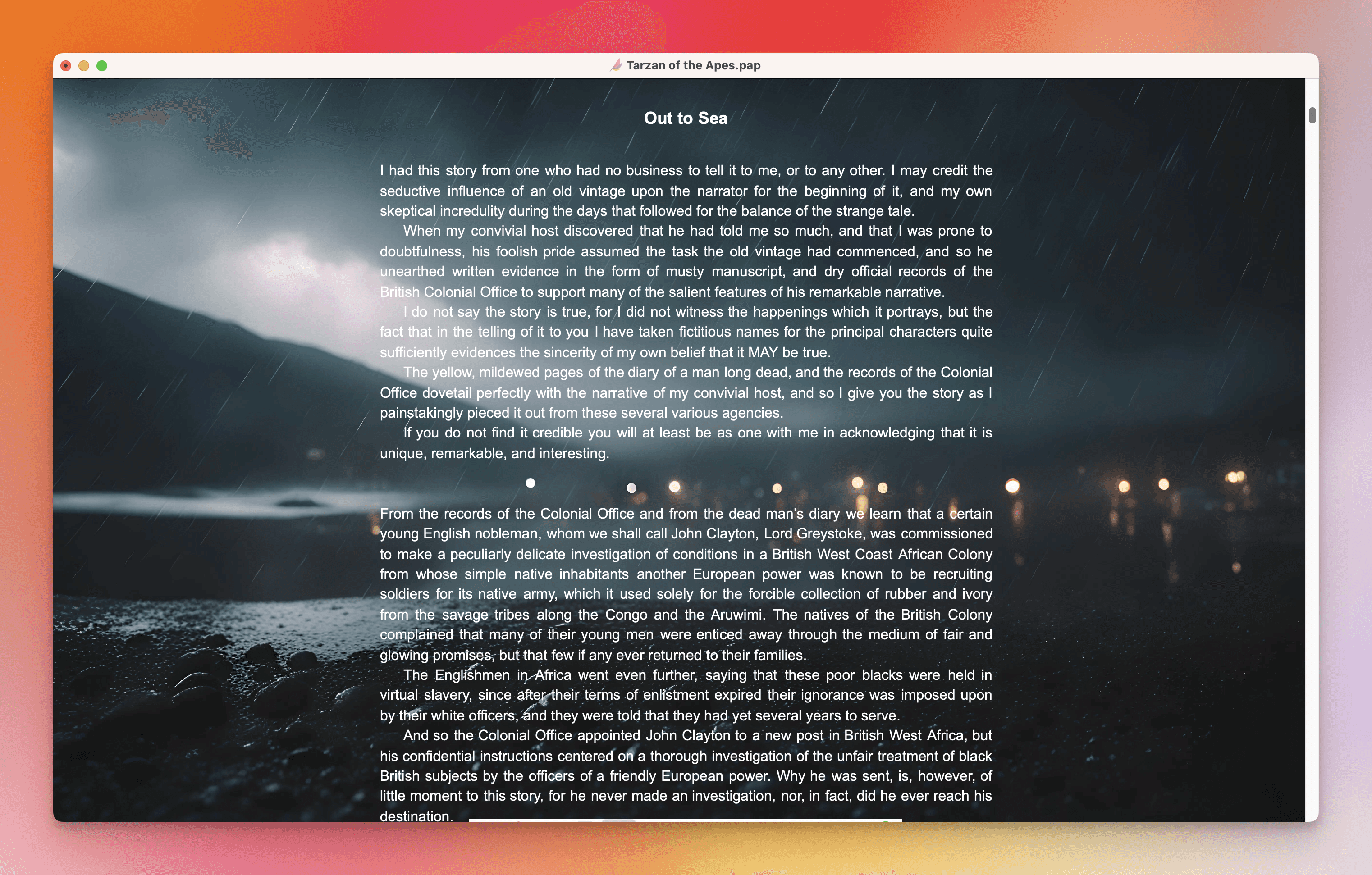
  • In the settings for Writing Focus, there's now a transparency slider that allows you to make the page view visible with your desired transparency. This is especially great if you have a stunning background image, but it slightly obstructs text readability.

  • Fix for the Writing Focus toolbar, which was visible as a gray line, a few pixels wide.

  • The Writing Focus is now no longer affected by Dark Mode in terms of text color, etc., keeping it perfectly aligned with the chosen mood there.

Variable Fonts

  • Variable fonts like New York or SF Pro are now accurately displayed in Papyrus and even exported to PDF.

Additional Improvements

  • The tutorial videos don't result in rare crashes anymore. For everyone affected, you are safe to activate them again in the Settings under Dialogs.

  • Correct quote pairing is no longer falsely flagged as incomplete.

  • Fix for the welcome steps after project creation that didn't resize properly when the window was minimized.

  • Fix for cut-off text fields in the title dialog of tables of contents.

  • The welcome steps with short videos after creating a new project have been newly developed in technology. They should run smoother now.

  • Project conversion now also allows for the creation of an endnote database again.

  • The scrollbar in the Thinkboard selection now appears correct again, after being briefly drawn in white and hard to spot.

  • Fix for manually entered angles of graphic objects that were reset under certain circumstances.

  • Unicode characters can now be used in filenames.

  • Umlauts in Zip filenames have also been fixed.

12.02g

14.03.2025

Fonts, Focus, and Fixes

Windowed Distraction-free

Improvements in the Version

From now on, the update notes are displayed right within Papyrus upon starting up!

Windowed Distraction Free Writing

  • You can now use the Writing Focus as a window without going full-screen. This way, you can write beautifully without covering the entire screen. There's a new setting for this under Distraction Free → Checkbox "Open in Full Screen".

  • In the settings for Writing Focus, there's now a transparency slider that allows you to make the page view visible with your desired transparency. This is especially great if you have a stunning background image, but it slightly obstructs text readability.

  • Fix for the Writing Focus toolbar, which was visible as a gray line, a few pixels wide.

  • The Writing Focus is now no longer affected by Dark Mode in terms of text color, etc., keeping it perfectly aligned with the chosen mood there.

Variable Fonts

  • Variable fonts like New York or SF Pro are now accurately displayed in Papyrus and even exported to PDF.

Additional Improvements

  • The tutorial videos don't result in rare crashes anymore. For everyone affected, you are safe to activate them again in the Settings under Dialogs.

  • Correct quote pairing is no longer falsely flagged as incomplete.

  • Fix for the welcome steps after project creation that didn't resize properly when the window was minimized.

  • Fix for cut-off text fields in the title dialog of tables of contents.

  • The welcome steps with short videos after creating a new project have been newly developed in technology. They should run smoother now.

  • Project conversion now also allows for the creation of an endnote database again.

  • The scrollbar in the Thinkboard selection now appears correct again, after being briefly drawn in white and hard to spot.

  • Fix for manually entered angles of graphic objects that were reset under certain circumstances.

  • Unicode characters can now be used in filenames.

  • Umlauts in Zip filenames have also been fixed.

12.02

28.01.2025

Enhanced Export and Stability

Import and Export, Especially doc/docx

  • With Papyrus 12, we updated the filter for importing and exporting doc/x and RTF to a brand-new version. However, a few serious bugs crept in, especially causing issues with headings. We've been tinkering and tweaking, and now everything should work flawlessly, just like before!

  • Copy & Paste of RTF and HTML, for example from the internet or Pages, could lose formatting in Papyrus 12. This should be fixed now and work perfectly.

Tutorial Videos

  • Completely revamped the technology behind tutorials: We've redeveloped the technology running in the background entirely, making tutorials significantly less memory-hungry and reducing those "strange crashes." Side note: On Linux, tutorials were a major reason for crashes, which should be much better now.

Book Designer

  • In preparation for the English public release, we've made the rounding of page margins more precise. The Book Designer now allows four decimal places, which greatly enhances working with inches.

  • The list of paper sizes is now sorted by size.

Backups

  • Backups could result in overly long path names due to automatic timestamps in the name, leading to an error message in Windows. Backup name stamps have been shortened.
    New format: Version + Date + Word Count.
    Example: 0.4 Aug29 W82524.pap

Additional Improvements

  • The toolbar for text styles in the Thinkboard is no longer incorrectly transparent.

  • The Thinkboard list displayed vertically now shows correctly drawn thumbnails again.

  • Undo/Redo icons are now correctly displayed according to each step.

  • Fixed missing localization for the Dark Mode icon and project conversion.

  • Fixed a rare bug where chapters were duplicated when an undo of a deletion was performed.

  • Fixed the rare message that the dictionary couldn’t be found. The message is now unobtrusive at startup.

  • When selecting the project main document in cases where Papyrus doesn’t know which document it is, all .pap documents within the project folder are now presented. This happens, for instance, if the main document has been renamed manually.

  • The context menu in the start view is now brighter again.

12.02

28.01.2025

Enhanced Export and Stability

Import and Export, Especially doc/docx

  • With Papyrus 12, we updated the filter for importing and exporting doc/x and RTF to a brand-new version. However, a few serious bugs crept in, especially causing issues with headings. We've been tinkering and tweaking, and now everything should work flawlessly, just like before!

  • Copy & Paste of RTF and HTML, for example from the internet or Pages, could lose formatting in Papyrus 12. This should be fixed now and work perfectly.

Tutorial Videos

  • Completely revamped the technology behind tutorials: We've redeveloped the technology running in the background entirely, making tutorials significantly less memory-hungry and reducing those "strange crashes." Side note: On Linux, tutorials were a major reason for crashes, which should be much better now.

Book Designer

  • In preparation for the English public release, we've made the rounding of page margins more precise. The Book Designer now allows four decimal places, which greatly enhances working with inches.

  • The list of paper sizes is now sorted by size.

Backups

  • Backups could result in overly long path names due to automatic timestamps in the name, leading to an error message in Windows. Backup name stamps have been shortened.
    New format: Version + Date + Word Count.
    Example: 0.4 Aug29 W82524.pap

Additional Improvements

  • The toolbar for text styles in the Thinkboard is no longer incorrectly transparent.

  • The Thinkboard list displayed vertically now shows correctly drawn thumbnails again.

  • Undo/Redo icons are now correctly displayed according to each step.

  • Fixed missing localization for the Dark Mode icon and project conversion.

  • Fixed a rare bug where chapters were duplicated when an undo of a deletion was performed.

  • Fixed the rare message that the dictionary couldn’t be found. The message is now unobtrusive at startup.

  • When selecting the project main document in cases where Papyrus doesn’t know which document it is, all .pap documents within the project folder are now presented. This happens, for instance, if the main document has been renamed manually.

  • The context menu in the start view is now brighter again.

12.01c

24.12.2024

Dark Mode and Other Treats

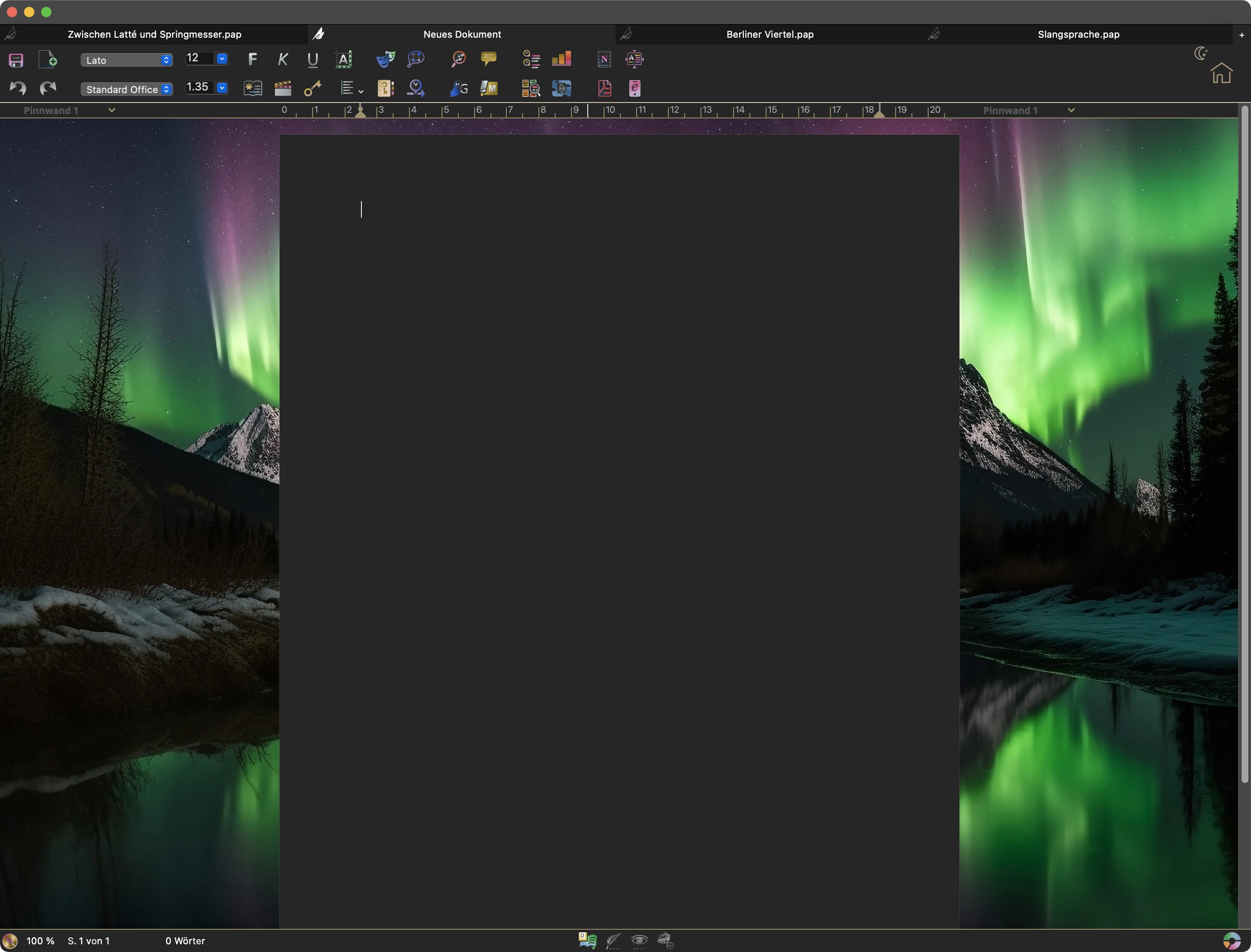
Papyrus 12 Night Writing Mode

The holidays are getting dark! Just in time for Christmas, we're updating Papyrus 12 with the eagerly awaited Dark Mode.

We and the entire Papyrus team wish you a wonderful Christmas and magical holidays with your loved ones.

Papyrus 12 Dark Mode

Whether it's the scene set in a dark alley or a romantic evening under the starlit sky, some words just deserve to be written in the dark!

The new Dark Mode can be manually or automatically toggled by the system. All functional areas switch to a dark color palette, including the toolbar and document.

Turning On and Off

The little house icon in the document window now shows a sun or moon to indicate day or night mode. A simple click on the star or moon icon switches you from Light Mode to Dark Mode and back.

In the Dark Mode settings, you can do the same. Or click "Automatic" to sync with your operating system. For example, if your Mac switches to Dark Mode at night, Papyrus will follow. Alternatively, you can set a "Timer" to decide when Dark Mode kicks in automatically.

Dark Mode Settings

Find the settings in a new tab under Settings → Appearance → Dark Mode.

Toolbar and Pinboard
We offer five different sets of filters that let the icons glow with a dark brilliance. Choose the one that best suits your atmosphere. The pinboard background also changes in line with the icon set, but you can adjust it independently of the Light Mode.

A slider for brightness and darkness balance lets you fine-tune the document and text appearance.

Light or Dark Documents

If you prefer to type in bright colors but like a dark theme, set it so the document remains in Light Mode only.

Dark Mode Colors for Highlights and Helper Elements

Dark Mode has its own set of colors, used exclusively while in this mode. This applies to comments, scenes, and events.
You can assign different colors for both Light and Dark Modes—or stick to the default settings. To change a color, switch to the mode for which you want the new color to apply. For settings that affect both modes, you'll be able to see how a color appears in either mode.

Dark Mode and Printing

Note, Dark Mode does NOT affect printouts. Write in the dark, but print as the original.

By enabling "View" → "Print Appearance", the document automatically switches to its original state with a white page and black text.
If you print or create a PDF while in Dark Mode, everything will appear in its original, light format.

More Updates and Improvements

  • Significantly improved loading times when leaving or entering a sleeping Papyrus.

  • The start view loads into an active status more swiftly now.

  • The timeline now features a new label illustrating the tension arc.

  • Story icons are no longer included when exporting to PDF if comments are enabled.

  • Slight rewording of status entries in the book view.

  • Initial improvements for macOS Dictation. More updates are expected, but you shouldn't face autocorrect conflicts or quotation mark issues anymore.

  • Fix for writing goals that weren't resetting their session while Papyrus was active. Setting to 00:00 now properly restarts at midnight as expected.

  • Resolved a crash when dragging mindmap bubbles into the sidebar.

  • A bug in book view projects was fixed, where a project would suddenly appear multiple times as a "copy."

  • Coffee tips have been streamlined to significantly reduce CPU usage and ensure they run more smoothly.
12.01c

24.12.2024

Dark Mode and Other Treats

Papyrus 12 Night Writing Mode

The holidays are getting dark! Just in time for Christmas, we're updating Papyrus 12 with the eagerly awaited Dark Mode.

We and the entire Papyrus team wish you a wonderful Christmas and magical holidays with your loved ones.

Papyrus 12 Dark Mode

Whether it's the scene set in a dark alley or a romantic evening under the starlit sky, some words just deserve to be written in the dark!

The new Dark Mode can be manually or automatically toggled by the system. All functional areas switch to a dark color palette, including the toolbar and document.

Turning On and Off

The little house icon in the document window now shows a sun or moon to indicate day or night mode. A simple click on the star or moon icon switches you from Light Mode to Dark Mode and back.

In the Dark Mode settings, you can do the same. Or click "Automatic" to sync with your operating system. For example, if your Mac switches to Dark Mode at night, Papyrus will follow. Alternatively, you can set a "Timer" to decide when Dark Mode kicks in automatically.

Dark Mode Settings

Find the settings in a new tab under Settings → Appearance → Dark Mode.

Toolbar and Pinboard
We offer five different sets of filters that let the icons glow with a dark brilliance. Choose the one that best suits your atmosphere. The pinboard background also changes in line with the icon set, but you can adjust it independently of the Light Mode.

A slider for brightness and darkness balance lets you fine-tune the document and text appearance.

Light or Dark Documents

If you prefer to type in bright colors but like a dark theme, set it so the document remains in Light Mode only.

Dark Mode Colors for Highlights and Helper Elements

Dark Mode has its own set of colors, used exclusively while in this mode. This applies to comments, scenes, and events.
You can assign different colors for both Light and Dark Modes—or stick to the default settings. To change a color, switch to the mode for which you want the new color to apply. For settings that affect both modes, you'll be able to see how a color appears in either mode.

Dark Mode and Printing

Note, Dark Mode does NOT affect printouts. Write in the dark, but print as the original.

By enabling "View" → "Print Appearance", the document automatically switches to its original state with a white page and black text.
If you print or create a PDF while in Dark Mode, everything will appear in its original, light format.

More Updates and Improvements

  • Significantly improved loading times when leaving or entering a sleeping Papyrus.

  • The start view loads into an active status more swiftly now.

  • The timeline now features a new label illustrating the tension arc.

  • Story icons are no longer included when exporting to PDF if comments are enabled.

  • Slight rewording of status entries in the book view.

  • Initial improvements for macOS Dictation. More updates are expected, but you shouldn't face autocorrect conflicts or quotation mark issues anymore.

  • Fix for writing goals that weren't resetting their session while Papyrus was active. Setting to 00:00 now properly restarts at midnight as expected.

  • Resolved a crash when dragging mindmap bubbles into the sidebar.

  • A bug in book view projects was fixed, where a project would suddenly appear multiple times as a "copy."

  • Coffee tips have been streamlined to significantly reduce CPU usage and ensure they run more smoothly.